Showing posts with label blogs. Show all posts

Monday, 7 May 2012

Thing 1: Blogs and blogging

Welcome to 23 Things for Professional Development! This is Thing Number 1.

In this Thing you will create your own blog (if you don't have one already) and will think and write about why you're taking part in 23 Things for Professional Development and what you're hoping to get out of it.

If you're already a happy, confident blogger, you can skip to What to write for Thing 1 below. Otherwise, keep reading for step-by-step blogging instructions.

Why blog?
Before we get to the how, a very few words on the why of blogging. Lots of new bloggers feel a bit strange writing down their thoughts and publishing them online for anyone to see.  It might seem like a rather vain thing to do.  But there are several reasons why blogging is a useful cpd tool:
  • blogging about what you've seen or done is a way of incorporating reflective practice into your professional life. We'll be talking more about reflective practice in Thing 5.
  • more prosaically, blogging about events will help you remember them more clearly in the future, and that's useful for job applications and when working towards qualifications.
  • you will positively impact on other people's development by blogging your ideas and experiences - professional engagement isn't just about your development, but it's also about sharing what you know with others.
  • by sharing your ideas and knowledge you'll get to meet new people and develop a wider professional network.
How to blog
There are various blogging platforms available online. Some of the most commonly used are Blogger, Wordpress, Tumblr, and Posterous. You're welcome to use any blogging platform that you like, but we're giving instructions here for Blogger, because it's quite easy to use.

Instructions

If these instructions leave you scratching your head, then have a look at this Blogger Tour, visit the Blogger help pages, or ask questions in the comments here.
  1. Go to http://www.blogger.com.
  2. If you already have a Google account and you'd like your blog to be linked to that, then sign in and proceed to step three. Otherwise, click on 'Get started'.
    1. Fill in the details on the 'Create an account' page.  When you've completed all the details click 'save'. You should get a confirmation email to the email address you supplied.
  3. You may now be taken to the Blogger 'dashboard' page, or straight to the process of setting up a blog.  The dashboard has two main parts - your profile, and your blogs. Investigate the 'edit profile' option and note that you can change the visibility of your name, email address and any profile picture you upload. You can change these settings at any time.  You can get to the dashboard at any time by clicking the dashboard link, or the Blogger logo (an orange letter 'B').
  4. If necessary, click on 'new blog'.  Fill in the required details on each page. All the options, including blog title, URL and the template design, can be changed later.
  5. You should now be given the option to make your first post. Posting is pretty straightforward - note that you have the option to write your post in html, or to use the 'compose' option. 'Compose' is much more straightforward - it's like using a wordprocessor, but if you have html knowledge you might sometimes want to tinker with the html of a post.  Options for adding links, images and formatting are available across the top of the editing box.
  6. When you've written a post you can preview it, save it for later, and, using the orange button, publish it online.
  7. click to enlarge
  8. If you have any questions, please ask them in the comments to this post, and someone will be along to try and help out. Google is currently in the process of changing the appearance of the Blogger appearance. If what you see doesn't match the pictures shown here then please say and we'll try and help out.
What to write for Thing 1
To start off your cpd23 blogging write a post about why you're taking part in the course. You could talk about where your career is now and where you'd like it to go, what you're hoping to learn from cpd23, which of the Things you're most (or least) looking forward to, how you feel about being a new blogger or how you'd like to improve your blogging, or anything else that relates to why you're doing this!

You'll notice that in whichever blogging platform you're using, there's normally an option to 'label' or 'tag' your post. Please tag your cpd23 posts with (you've guessed it) 'cpd23', in addition to anything else you'd like to use, so that you, we and the great wide world, can keep a track of your cpd23 progress!

And finally...
If you'd like to read more on this topic you could do worse than to look at Ned Potter's 'Everything you've ever wanted to know about library blogs and blogging!' and follow the links he suggests.

This week there are two Things to do. Thing 2 will be along shortly.

Monday, 20 June 2011

Thing 2: Investigate some other blogs

(This is Thing 2 in the programme. If you've not done so already, start off at Thing 1, here.)

Now you've set off with your own blogging, it's time to meet the neighbours: see who else is taking part and what they're saying. 

First of all, you need to let other people know that you're taking part.  Do that by completing the 23 Things for Professional Development registration form.

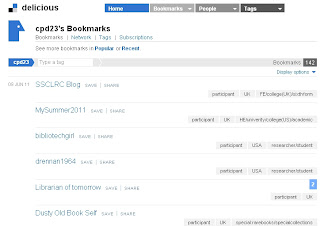
Screenshot of the cpd23 Delicious bookmarks
At the time of writing we already have over 100 blogs signed up: you can see an alphabetical list on our participants page. You probably don't have time to visit them all, so you can refine your choices using the country and sector tags on our Delicious bookmarks. EDITED 29/9/11 After recent changes to Delicious, our participants are now also listed on Diigo, where they are currently easier to browse.

If you think you've signed up, but don't appear in the Delicious list after a day or two, leave a comment here and we'll check what's happened.

Now, make sure that people can comment on your blog. In Blogger, look in the 'settings' tab for the 'comments' option. It's a good idea to say yes to 'show word verification for comments', because that helps to stop spam comments. If you say yes to 'comment moderation', you will receive an email (to the address specified) when someone comments - and you will have to approve the comment before it appears publicly on your blog.

Lastly, go and visit some blogs, read some posts and leave some comments to let the authors know what you thought. What did you enjoy about their post? Do you have similar or contrasting experience to share?

Being able to comment and discuss ideas is what makes blogging - and social media in general - so useful and valuable as a tool for personal and professional development. Comments on your own blog can offer advice and support, they might point you towards useful resources, or they might challenge your opinions and help you refine your arguments. By commenting on other people's blog you're likely to think more deeply about what you've read and what you think about an issue, you'll also be able to share some of your expertise, and you'll get your face (or, at least your moniker) more widely known.  It can be daunting to comment on the blog of someone you may never have met, but do take the plunge, even if it's just to say hello, or to say that you enjoyed a post.

To finish Thing 2, once you've explored the cpd23 neighbourhood a little, write a post on your blog about what you've read and who you've met.

Further Reading:
If you'd like to investigate the wider world of library and librarian blogging, then why not investigate the UK Library Blogs/Bloggers Wiki, and if you know of similar sources from librarians elsewhere in the world, let us know in the comments.

EDITED 29 Sep. 2011: Delicious has implemented a lot of changes in the last few days which make it pretty hard to navigate the cpd23 blogs.  You can now browse the participants on Diigo, a different bookmarking site.

Thing 1: Blogs and blogging

Welcome to 23 Things for Professional Development! This is Thing Number 1.

In this Thing you will create your own blog (if you don't have one already) and will think and write about why you're taking part in 23 Things for Professional Development and what you're hoping to get out of it.

If you're already a happy, confident blogger, you can skip to What to write for Thing 1 below. Otherwise, keep reading for step-by-step blogging instructions.

Why blog?
Before we get to the how, a very few words on the why of blogging. Lots of new bloggers feel a bit strange writing down their thoughts and publishing them online for anyone to see.  It might seem like a rather vain thing to do.  But there are several reasons why blogging is a useful cpd tool:
  • blogging about what you've seen or done is a way of incorporating reflective practice into your professional life. We'll be talking more about reflective practice in Thing 5.
  • more prosaically, blogging about events will help you remember them more clearly in the future, and that's useful for job applications and when working towards qualifications.
  • you will positively impact on other people's development by blogging your ideas and experiences - professional engagement isn't just about your development, but it's also about sharing what you know with others.
  • by sharing your ideas and knowledge you'll get to meet new people and develop a wider professional network.
How to blog
There are various blogging platforms available online. Some of the most commonly used are Blogger, Wordpress, Tumblr, and Posterous. You're welcome to use any blogging platform that you like, but we're giving instructions here for Blogger, because it's quite easy to use.

Instructions

This video from Blogger shows you what to do. There are written instructions below, too, if you prefer those.


Click to enlarge
  1. Go to http://www.blogger.com.
  2. If you already have a Google account and you'd like your blog to be linked to that, then sign in and proceed to step three. Otherwise, click on 'Get started'.
    1. Fill in the details on the 'Create an account' page.  When you've completed all the details click 'save. You should get a confirmation email to the email address you supplied.
  3. You should now be on the Blogger 'dashboard' page. It has two main parts - your profile, and your blogs. Investigate the 'edit profile' option and note that you can change the visibility of your name, email address and any profile picture you upload. You can change these settings at any time.
  4. When you've set up your profile as you want, click on 'create your blog now'
  5. Fill in the required details on each page. All the options, including blog title, URL and the template design, can be changed later.
  6. You should now be given the option to make your first post. Posting is pretty straightforward - note that you have the option to write your post in html, or to use the 'compose' option. 'Compose' is much more straightforward - it's like using a wordprocessor, but if you have html knowledge you might sometimes want to tinker with the html of a post.  Options for adding links, images and formatting are available across the top of the editing box.
  7. When you've written a post you can preview it, save it for later, and, using the orange button, publish it online.
  8. If you have any questions, please ask them in the comments to this post, and someone will be along to try and help out.
What to write for Thing 1
To start off your cpd23 blogging write a post about why you're taking part in the course. You could talk about where your career is now and where you'd like it to go, what you're hoping to learn from cpd23, which of the Things you're most (or least) looking forward to, how you feel about being a new blogger or how you'd like to improve your blogging, or anything else that relates to why you're doing this!

You'll notice that in whichever blogging platform you're using, there's normally an option to 'label' or 'tag' your post. Please tag your cpd23 posts with (you've guessed it) 'cpd23', in addition to anything else you'd like to use, so that you, we and the great wide world, can keep a track of your cpd23 progress!

And finally...
If you'd like to read more on this topic you could do worse than to look at Ned Potter's 'Everything you've ever wanted to know about library blogs and blogging!' and follow the links he suggests.

This week there are two Things to do. Thing 2 will be along shortly.